JSF Ajax

|
|

JSF Ajax support
Ajax (Asynchronous JavaScript and XML) is a group of interrelated web development methods used on the client-side to create interactive web applications. With Ajax , web applications can send data to, and retrieve data from, a server asynchronously (in the background) without interfering with the display and behavior of the existing page. Data is usually retrieved using the XMLHttpRequest object. Despite the name, the use of XML is not needed (JSON is often used instead), and the requests need not be asynchronous.
JSF 2.0 has been released with is new Ajax functionnality.
One of the major additions to this version of JSF is standard Ajax support. This article covers Ajax features in JSF 2. If you are familiar with RichFaces and specifically the a4j:support tag or Primefaces then learning how to use Ajax features in JSF 2 is going to be very easy.
Many concepts and features are being carried over from RichFaces.
To illustrate Ajax in JSF 2 i will show you how to manage the tab and activate the correponding tab content in Ajax without reloading the page from the server.
Requirements
| Name | Version |
|---|---|
| JSF | version 2 or late |
| Java | 1.5 |
| Primefaces | > 3.0 |
Tab manager using Ajax and JSF
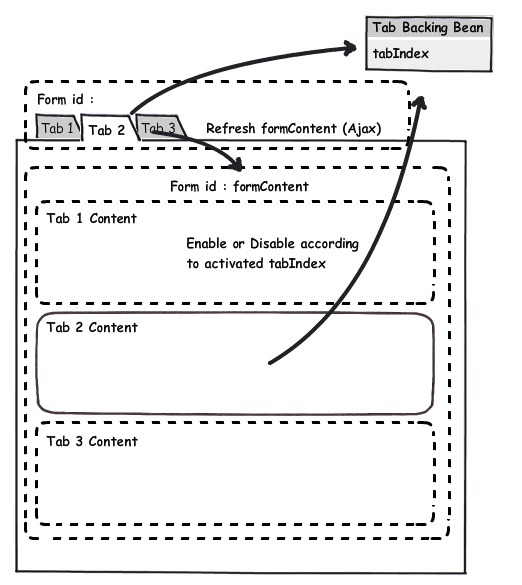
The following sketch illustrate the concept. We have three tabs in a form (formNav) and three tab content in another form (formContent). We want to make visible tab content according to the current tab index. To do so we have the following process :
- When the user clicks on tab an asynchronous call is made to the tab manager backing bean with the active tab index as a parameter
- The same button send an update request to the form (formContent)
- All three tab contents in the formContent will ask the tab backing bean if they are active and be visible or not according to it
JSF navigation tabs
Find below three the tab. As you can see there is no action on the command link. On the other hand you have a f:ajax tag defined with a call to the tab manager backing bean named (tabBB). The method called is handleTabChange. The method is responsible to read the parameter provided using the f:param tag and update the current tab index managed by the tabBB backing bean.
The render property indicate that the element with the id contentForm should be updated when clicked. The colon (:) indicate that the contentForm element should be found starting on the root of the DOM.

Tab manager backing bean
Let's take a look at the tab manager backing bean called tabBB (default name if you don't provide a name for the managedBean annotation). The handleTabChange method as explained previously is reponsible to read the tabIndex parameter and set the backing bean property using this parameter.
We have now a session scope backing bean updated with the current tab index

Tab content
The content panels are defined in the contentForm . The form should be refreshed according to the render parameter defined in the ajax click event.Each output panel will then compare the current tab index in the tab manager backing bean and render they correpond to the active tab index
Conclusion
Writing Ajax has never been so easy. Now you should have a good understanding of what JSF and AJAX can do to help you to build a real-world Web application.
If you have any remark or questions feel free to put a comment.
If you enjoyed this tutorial and want to promote it don't hesitate to click on
Comments
However I would have done this completely without primefaces. It just creates unnecessary confusion to a simple and functional example.
Yes, this example is using some Primefaces component but you can easily use native JSF component instead
Thanks for the straight and crisp explanation of ajax with working examples.
RSS feed for comments to this post